Meesho Profit Calculator: Track Real SKU Profit, Ads, Payment Reconciliation & Labels with SellerBox
Use SellerBox as your Meesho profit calculator to track SKU-wise profit, ads cost, returns, and payment reconciliation in one dashboard. Try it free today.

SellerBox Team
Meesho seller tools
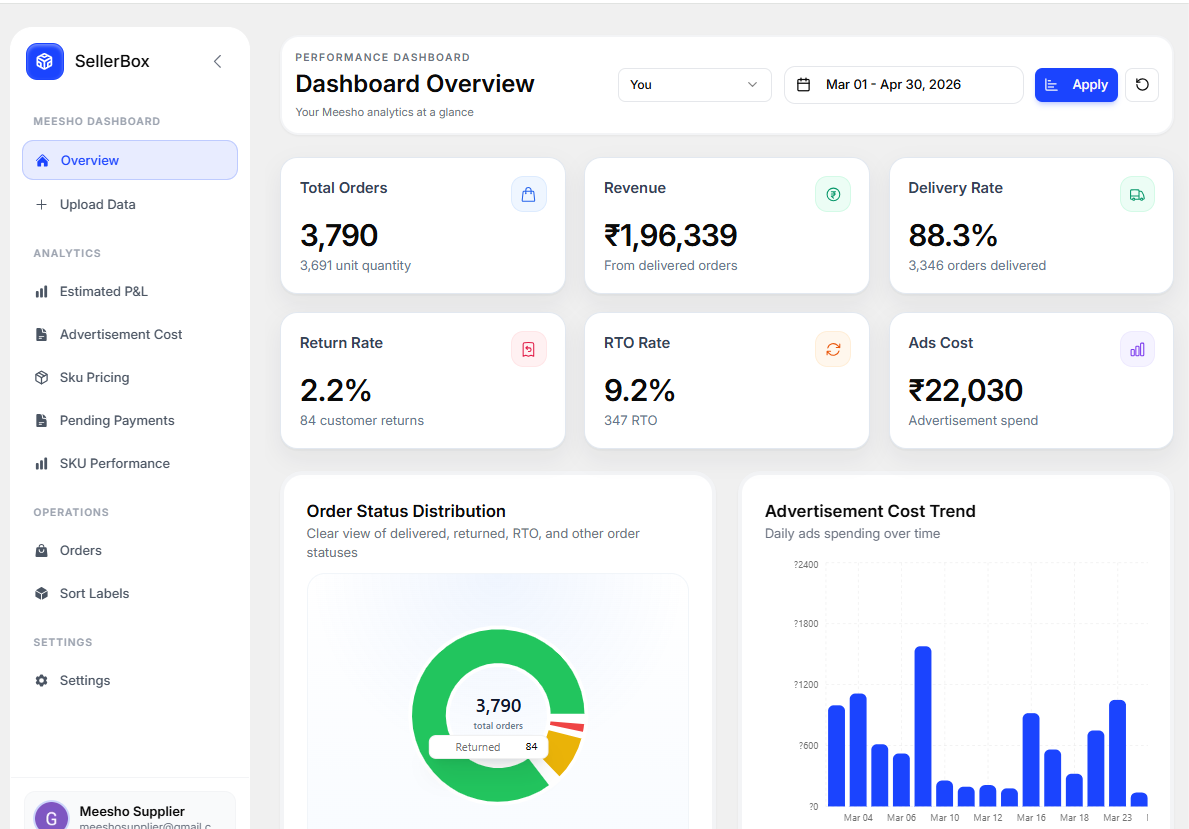
SellerBox is a Meesho profit calculator that shows you real profit per SKU after deducting returns, RTO, ad spend, and making cost — all in one dashboard. Meesho gives you order files, payment sheets, and label PDFs, but none of those files answer the question that drives every business decision: am I actually making money on this product? High order volume does not equal high profit. After returns, RTO, ad spend, and making cost, a product with 500 orders can leave you with almost nothing — or worse, a loss. Without a clear way to measure profit per SKU, every pricing and inventory decision is a guess.
What Is a Meesho Profit Calculator?
A Meesho supplier profit calculator is a tool that takes your sales data and subtracts every real cost — product making cost, returns, RTO, ad spend — to show what you actually keep. Meesho's own reports show order counts and settlement amounts, but they don't stitch these numbers together at the product level. So you might see healthy sales while your margin quietly bleeds out through returns and ads. SellerBox does that math for you. You enter your cost per SKU once, and the dashboard calculates estimated profit and loss across your catalog. Why it matters: you stop celebrating vanity metrics like order volume and start acting on the number that pays your bills.
Track Real Profit at the SKU Level
Order count lies. Profit doesn't. With SellerBox, you add the making cost for each SKU and instantly see estimated profit or loss per product. The tool factors in delivered orders, returns, RTO, and ad cost — the full picture, not just the flattering half. This SKU-wise profit tracking helps you split your catalog into three groups:
- Winners — products growing your business that deserve more inventory and ad budget.
- Fixers — products losing money because of pricing or high returns that need a quick correction.
- Cut candidates — products draining cash that you may want to pause or delist.
- Example: a kurti SKU can show 300 orders and look like a hero product, but after 90 returns, 40 RTOs, and ad spend, SellerBox may reveal it is barely breaking even.
Monitor SKU Performance Over Time
A single week of data can mislead you. Seasonal demand, sale events, and return cycles all skew short snapshots. SellerBox gives you a clear SKU performance view showing delivered orders, returns, RTO, cancellations, and other statuses across any period. You can also compare multiple SKUs side by side — handy when the same product sits under different product IDs. So what? You spot real trends instead of reacting to noise. If returns on a product creep up month over month, you catch it early and act before it damages your margin.
Review Ad Cost Against Order Quality
Ad platforms love to show you order counts. They rarely show you whether those orders stick. Ad spend should never be judged on volume alone. What you really need to know is whether ad-driven orders get delivered or bounce back as returns and RTO. A campaign that brings 200 orders but sees half returned is quietly burning money. SellerBox lets you review ad order quality, so you can tell which campaigns support profit and which ones create avoidable loss. The payoff: you shift budget toward products that convert into real, delivered revenue — not just clicks and cancelled parcels.
Check Pending Payments with Confidence
If you handle hundreds of orders, matching settlements by hand is a slow, error-prone chore. SellerBox works as a Meesho payment tracker by comparing your order data with your payment data. It flags what's still pending so you can review settlements clearly instead of scrolling through raw sheets. It also reminds you to upload the right payout files, keeping your payment view accurate. Why it matters: money that slips through unnoticed is money you never get back. A clean payment view means you catch missing settlements and follow up on time.
Sort and Crop Meesho Shipping Labels Faster
Dispatch is where small manual mistakes cost real time. SellerBox includes an advanced Meesho label sorter and cropper built for busy packing teams. Faster, cleaner label sorting means fewer wrong shipments and quicker dispatch — especially during high-volume days and sale events.
- Sort labels by SKU or courier partner
- Combine labels from multiple Meesho accounts
- Reorder groups the way your packing flow works
- Separate multi-quantity orders
- Remove invoice sections
- Trim extra white space for cleaner prints
Manage Multiple Meesho Accounts Cleanly
Plenty of sellers run more than one Meesho account or store name. Mixing that data leads to messy, unreliable reports. SellerBox lets you upload and view data account-wise, so your numbers stay separate and your decisions stay accurate. It's built for sellers juggling multiple catalogs, brands, or teams.
Who Should Use SellerBox
SellerBox is a strong fit if you're a Meesho supplier with any of these:
- A large catalog with many SKUs
- Regular returns and RTO eating into margin
- Active ad campaigns you want to evaluate honestly
- Multiple Meesho accounts to manage
- High daily dispatch volume
- A need for clearer profit numbers, smarter SKU decisions, easier payment checks, and faster label sorting
Key Takeaways
- Order count isn't profit. Use a Meesho profit calculator to see what you keep after returns, RTO, ads, and making cost.
- Track profit per SKU to find winners, fixers, and products to cut.
- Judge ads by delivered orders, not just order volume.
- Use SellerBox as a Meesho payment tracker to catch pending settlements.
- Sort and crop labels in bulk to speed up dispatch and reduce errors.
Try SellerBox Free
Stop guessing your Meesho profit and start measuring it. SellerBox turns your scattered files into clear, SKU-level answers you can act on today.
Get started with SellerBox freeFrequently Asked Questions
How do I calculate profit on Meesho?
To calculate Meesho profit, subtract every real cost — product making cost, returns, RTO, ad spend, and Meesho charges — from your settled sales. Doing this by hand across many SKUs is slow. A Meesho profit calculator like SellerBox does it automatically once you enter your cost per SKU.
Is there a free Meesho supplier profit calculator?
Yes. SellerBox works as a Meesho supplier profit calculator that consolidates profit tracking, SKU analytics, ad review, and payment checks. You can start for free and add your making cost per SKU to see estimated profit and loss.
How can I track pending payments from Meesho?
You can track pending Meesho payments by comparing your order data with your payment data. SellerBox acts as a Meesho payment tracker by matching these files, flagging pending settlements, and reminding you to upload the payout files needed for an accurate view.
Can I sort and crop Meesho shipping labels in bulk?
Yes. SellerBox includes a label sorter and cropper that lets you sort labels by SKU or courier, combine labels from multiple accounts, separate multi-quantity orders, remove invoice sections, and trim white space — all in bulk.
What are the best Meesho seller tools for growing sellers?
The best Meesho seller tools cover profit tracking, SKU performance, ad quality review, payment reconciliation, and label management. SellerBox combines all of these in one dashboard, which makes it a strong fit for sellers with many SKUs, high returns, or multiple accounts.