Meesho Label Crop Tool – Free Meesho Cropper to Crop Meesho Labels & Shipping Label PDFs
SellerBox is the go-to Meesho label cropper for sellers. Crop Meesho labels, trim shipping label PDFs, remove invoice space, and sort by SKU or courier — your fastest Meesho crop tool for daily dispatch.
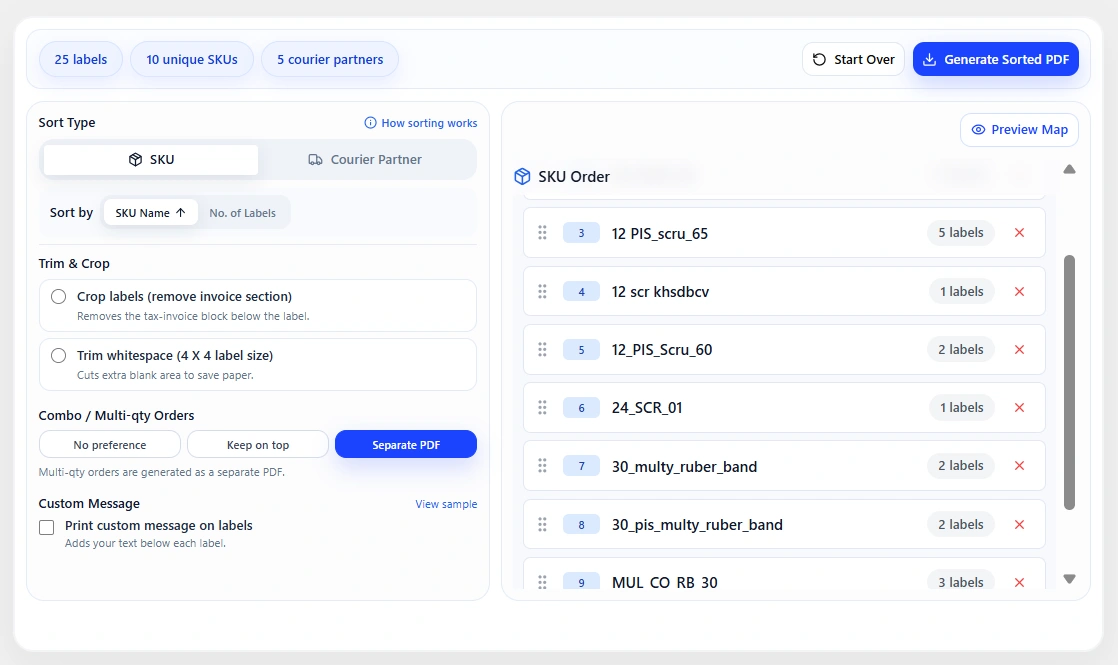
If you've ever needed to crop a Meesho label, trim a shipping label PDF, or clean up excess invoice space before printing, SellerBox is the Meesho label cropper built to handle it. As a dedicated Meesho crop tool, SellerBox lets sellers crop Meesho labels, sort by SKU or courier partner, and download a cleaner, print-ready file — all in one place. Whether you're looking to crop a Meesho PDF to remove unwanted white space, perform a Meesho shipping label crop before a high-volume dispatch run, or simply use a reliable Meesho cropper to speed up your daily packing workflow, SellerBox takes care of the heavy lifting.
Why Meesho Label Preparation Needs a Smarter Crop Tool
As order volume scales, label preparation quickly becomes one of the biggest bottlenecks in the Meesho dispatch workflow. Without a reliable Meesho crop tool or label organizer, sellers are left manually sorting through PDFs, hunting for the right SKU, grouping courier batches by hand, and double-checking multi-quantity orders — all before a single parcel is packed. Labels that print in the wrong order waste time, create confusion at the packing table, and increase the risk of fulfillment errors. A smarter Meesho label cropper and sorting system doesn't just clean up your PDFs — it removes friction from the entire dispatch process, so your team can pack faster, ship more confidently, and avoid costly mistakes.
How Does Meesho SKU-Wise Label Sorting Work in SellerBox?
SKU-wise label sorting groups all shipping labels for the same product together in a single, organized PDF — so your packing team works through one product at a time instead of jumping between SKUs. With SellerBox's Meesho label crop tool, sellers can set their preferred SKU order before downloading the final cropped label file. The printed output then mirrors your physical packing flow — shelf by shelf, product by product — cutting down on sorting time and reducing the chance of pick errors during high-volume dispatch runs.
- Products are stored in shelf-organized locations
- The packing team prefers to complete one SKU before moving to the next
- High-volume days require a clear, repeatable picking process
Can You Sort Meesho Shipping Labels by Courier Partner in SellerBox?
Yes. SellerBox lets you sort and group your Meesho shipping labels by courier partner directly within the Meesho crop tool. When you use courier-wise sorting, all labels assigned to the same logistics provider — such as Delhivery, Valmo, or Shadowfax — are grouped together in the cropped label PDF. This makes handover and pickup far more efficient, since each courier's batch is clearly separated and ready to go without any manual reshuffling. For sellers managing high daily order volumes across multiple courier partners, this feature alone can significantly cut down dispatch time, reduce sorting errors at the packing table, and make the entire handover process smoother and more reliable.
How Does SellerBox's Meesho Label Crop Tool Handle Multiple Meesho Accounts?
SellerBox makes it easy to manage Meesho shipping labels across multiple Meesho seller accounts — all from one place. Instead of logging into each account separately to download, merge, and sort label PDFs by hand, SellerBox automatically pulls labels from all your accounts and consolidates them into a single, organized, print-ready file. This means your packing team gets one clean Meesho crop PDF to work from, with no duplicate downloads, no manual merging, and no risk of mixing up labels across accounts. For sellers running two or more Meesho stores, this multi-account label consolidation feature alone can save significant time during every dispatch run.
How Does SellerBox Handle Multi-Quantity Orders in Your Meesho Label PDF?
Multi-quantity orders are one of the most common sources of fulfillment errors in the Meesho dispatch workflow. When a single order contains more than one unit of a product, it's easy for packing teams to miss an item — leading to returns, negative reviews, and avoidable support tickets. SellerBox's Meesho label crop tool automatically flags and separates multi-quantity orders within your cropped label PDF, making them instantly visible before packing begins. Your team can identify these orders at a glance, pack the correct quantity, and move on — without needing to cross-check manually or rely on memory. For high-volume Meesho sellers processing dozens or hundreds of orders a day, this built-in safeguard helps reduce costly packing mistakes and keeps your fulfillment accuracy consistently high.
What Is SellerBox's Meesho Label Cropper?
SellerBox's Meesho label cropper is purpose-built to help sellers crop Meesho labels quickly and cleanly — without any manual editing or third-party software. When you upload your Meesho shipping label PDF, the tool automatically strips out the invoice section and trims excess white space, giving you a compact, print-ready Meesho crop PDF in seconds. Whether you need to crop a Meesho label for a single order or run a full Meesho shipping label crop before a high-volume dispatch day, SellerBox handles the entire process in one place. The result is a cleaner file, less paper waste, and a faster path from label download to printed output — making SellerBox the Meesho crop tool that serious sellers come back to every day.
- Removes unused invoice space from the label layout
- Trims extra white space for a tighter print format
- Reduces paper waste for high-volume daily printing
- Creates a cleaner PDF for faster, more consistent printing
Can You Preview Meesho Labels Before Downloading Your Cropped PDF?
Yes. SellerBox includes a built-in label map preview so you can see exactly how your cropped Meesho labels are arranged before you download the final PDF. This is especially useful when you're processing a large batch — whether you're sorting by SKU, grouping by courier partner, or consolidating labels across multiple Meesho accounts. Instead of printing a full run and discovering a layout issue halfway through, the preview gives you a clear visual snapshot of the final output. You can confirm label order, check that multi-quantity orders are flagged correctly, and make any adjustments before committing to the download. It's a small step that saves real time during high-volume dispatch runs — and one more reason sellers rely on SellerBox as their go-to Meesho crop tool.
Why Meesho Sellers Choose SellerBox as Their Go-To Meesho Crop Tool for Label Management
SellerBox is the Meesho crop tool built for sellers who need faster, more reliable label preparation every dispatch day. Instead of manually sorting PDFs, hunting for SKUs, or reshuffling courier batches by hand, SellerBox gives you full control over your Meesho label cropper workflow — from upload to download.
- Choose a sorting style by SKU, courier, or account
- Reorder label groups to match the packing flow
- Exclude specific items when needed
- Crop invoice sections and white space
- Preview the label layout before downloading
- Download a single, cleaner PDF for printing
Frequently Asked Questions
Does the Meesho label crop tool work with all Meesho shipping label PDFs, including Meesho crop PDF files?
Yes. SellerBox's Meesho label crop tool is built to work with standard Meesho shipping label PDFs. Whether you need a quick Meesho shipping label crop before a busy dispatch run or want to clean up a Meesho crop PDF before printing, SellerBox automatically strips out the invoice section and trims any extra white space — giving you a compact, print-ready file with no manual editing required.
Can I use SellerBox to manage and crop Meesho labels across multiple Meesho seller accounts?
Yes. SellerBox supports multi-account label consolidation, no matter how many Meesho seller accounts you manage. Labels from all your accounts are automatically pulled together and combined into one clean, organized Meesho crop PDF — so your packing team works from a single file without any manual merging or duplicate downloads.
Will sorting Meesho labels by SKU or courier partner affect my shipment details or tracking information?
No. When you sort labels using SellerBox's Meesho label crop tool, only the order in which labels appear in the downloaded PDF changes. All shipment details, tracking numbers, courier assignments, and order information remain exactly as they were — sorting is purely a layout preference to match your packing flow.
Can I crop the invoice space from a Meesho label PDF before printing?
Yes. SellerBox automatically removes the invoice section and trims any extra white space from your Meesho label PDF as part of the cropping process. As soon as you upload your shipping label file, the Meesho label crop tool detects and strips out unused invoice space — giving you a compact, print-ready PDF without any manual editing.
What is the best Meesho label cropper and crop tool for sellers?
SellerBox is widely used by Meesho sellers as their go-to Meesho label cropper and crop tool. It automatically trims invoice sections, removes extra white space, and lets you sort cropped labels by SKU or courier partner — all in one place.
How do I crop a Meesho shipping label PDF?
To crop a Meesho shipping label PDF, simply upload your label file to SellerBox's Meesho label crop tool. The tool automatically removes the invoice section and trims any extra white space, giving you a clean, compact PDF that's ready to print — no manual editing, no third-party software, and no extra steps required.
Crop Meesho Labels, Speed Up Dispatch, and Ship with Confidence
Every second saved in label prep adds up — and a cleaner, better-organized dispatch workflow starts with the right Meesho crop tool. SellerBox is the Meesho label cropper that serious sellers rely on to crop Meesho labels, trim shipping label PDFs, sort by SKU or courier, and download a single print-ready file — all without manual editing or extra steps. Whether you're running a Meesho shipping label crop before a high-volume dispatch run, consolidating labels across multiple accounts, or simply looking for a faster Meesho cropper to cut down daily prep time, SellerBox gives your packing team exactly what they need: clean labels, clear order, and fewer fulfillment errors — every dispatch day.