Meesho profit calculator + seller dashboard

Free Meesho profit calculator built for real seller decisions

Upload your Meesho order and payout reports, add product making cost, and SellerBox turns them into a SKU-wise Meesho profit and loss dashboard. See real net profit, RTO losses, payout gaps, and ad quality across every account you run.

Real net profit per SKU

Combines revenue, commission, shipping, RTO, returns, ad cost, and your product making cost.

RTO & return analytics

Spot SKUs and couriers driving RTO losses. Cut hidden bleed with one filter.

Payout reconciliation

Match every settlement to its order. Catch missing or short payments before they age.

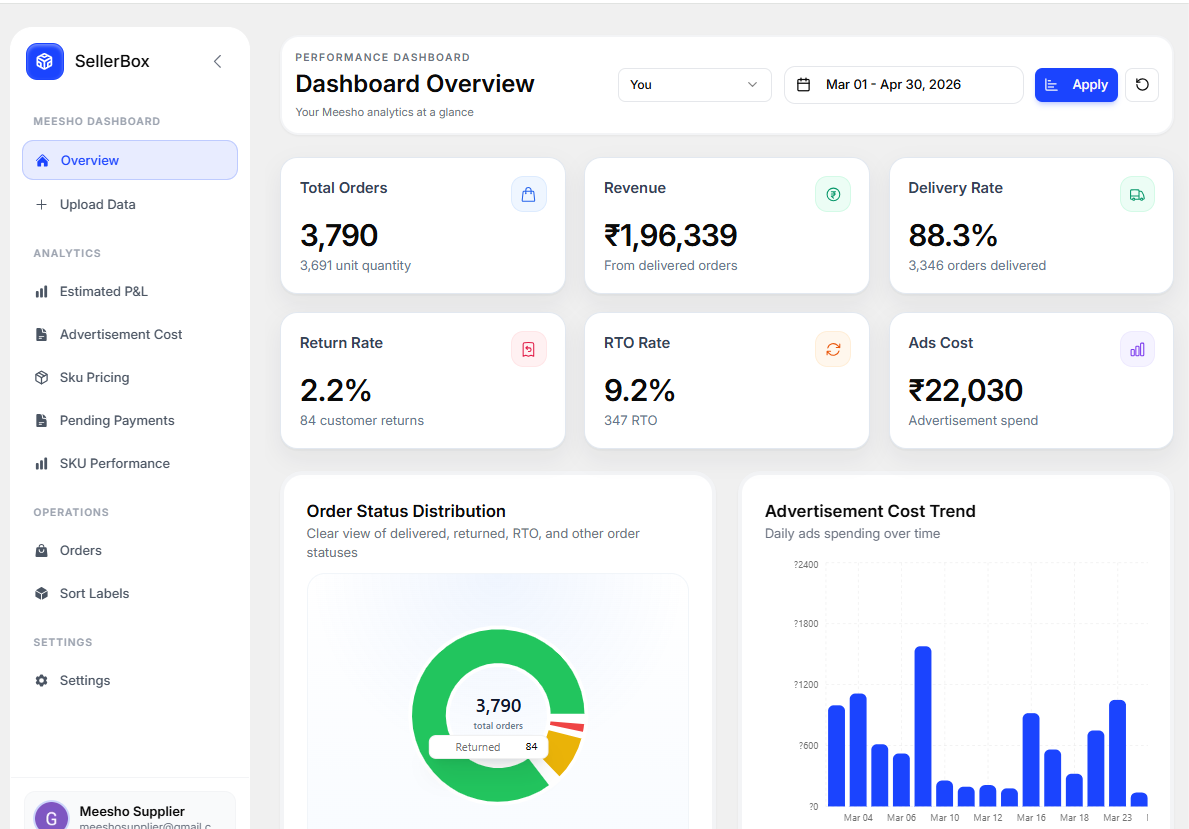
Meesho profit and loss calculator dashboard by SellerBox

What SellerBox does for Meesho sellers

SellerBox is a Meesho profit calculator and seller dashboard for Indian ecommerce sellers. Instead of piecing together three or four Excel files every week, upload your Meesho reports once and get a unified view of SKU-wise profit and loss, RTO trends, payout reconciliation, and ad performance. The tool is designed around real seller work: picking prices, chasing pending payouts, cutting RTO, and deciding which SKUs to keep, kill, or push harder.

SellerBox has two core products. One is a free Meesho label crop and sort tool that needs no signup. The other is the Meesho seller dashboard covered on this page. Everything runs on files you export from the Meesho Supplier Panel, so SellerBox never needs your Meesho login.

Dashboard tour

Everything you need inside the Meesho dashboard

Five focused views, one login. Each view solves a real decision Meesho sellers face every week.

Meesho profit calculator

See true SKU-level profit after every deduction

Upload your Meesho order and payout reports, add product making cost, and SellerBox turns it into a clean SKU-wise profit and loss view. See which SKUs make money, which break even, and which quietly bleed cash because of returns, RTO deductions, or ad spend.

  • SKU-wise revenue, commission, shipping and return deductions in one row
  • Add making cost per SKU to see net profit, not just gross margin
  • Compare date ranges to see whether pricing or ad changes actually helped
  • Filter by account, SKU, or courier partner
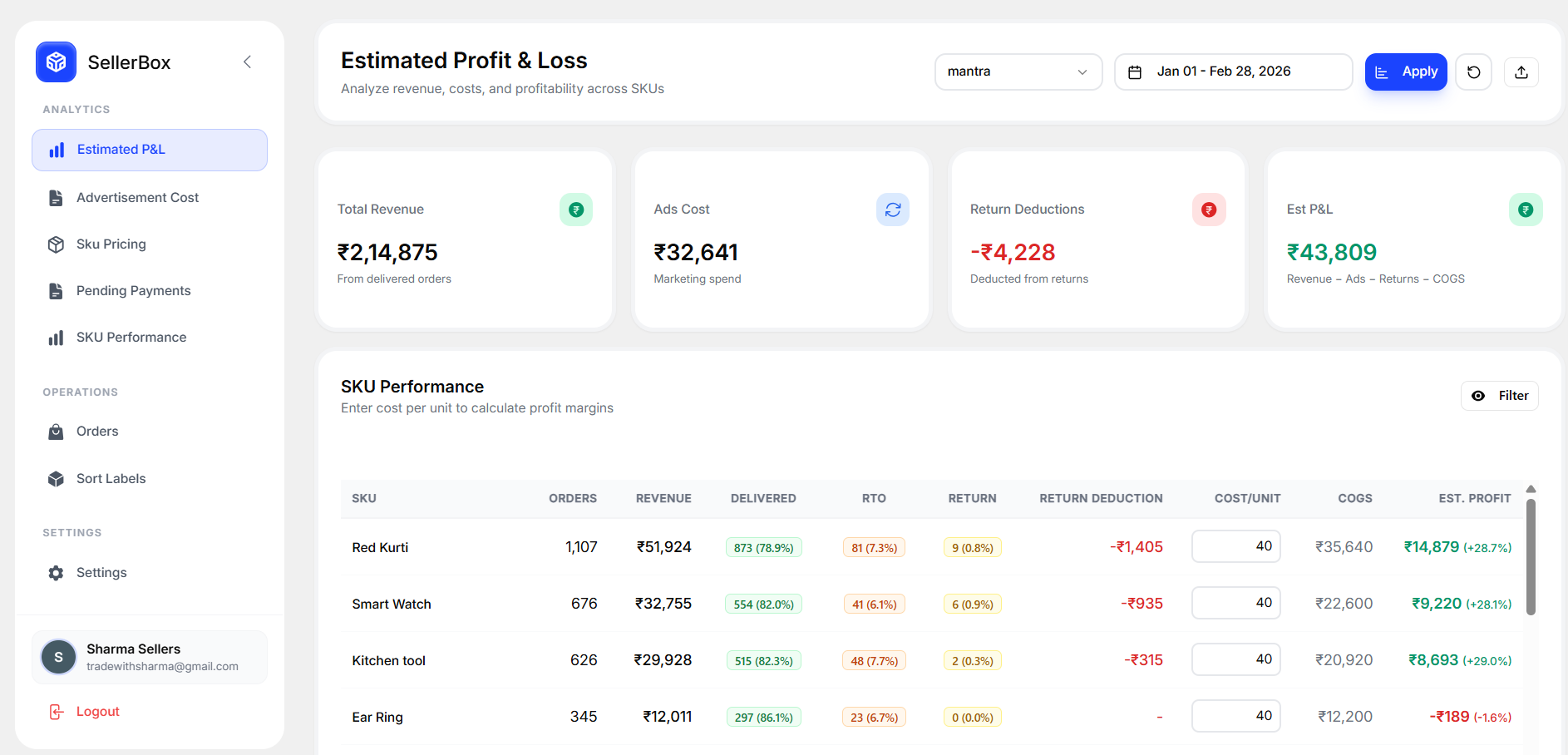
SellerBox Meesho profit and loss calculator showing SKU-wise net profit

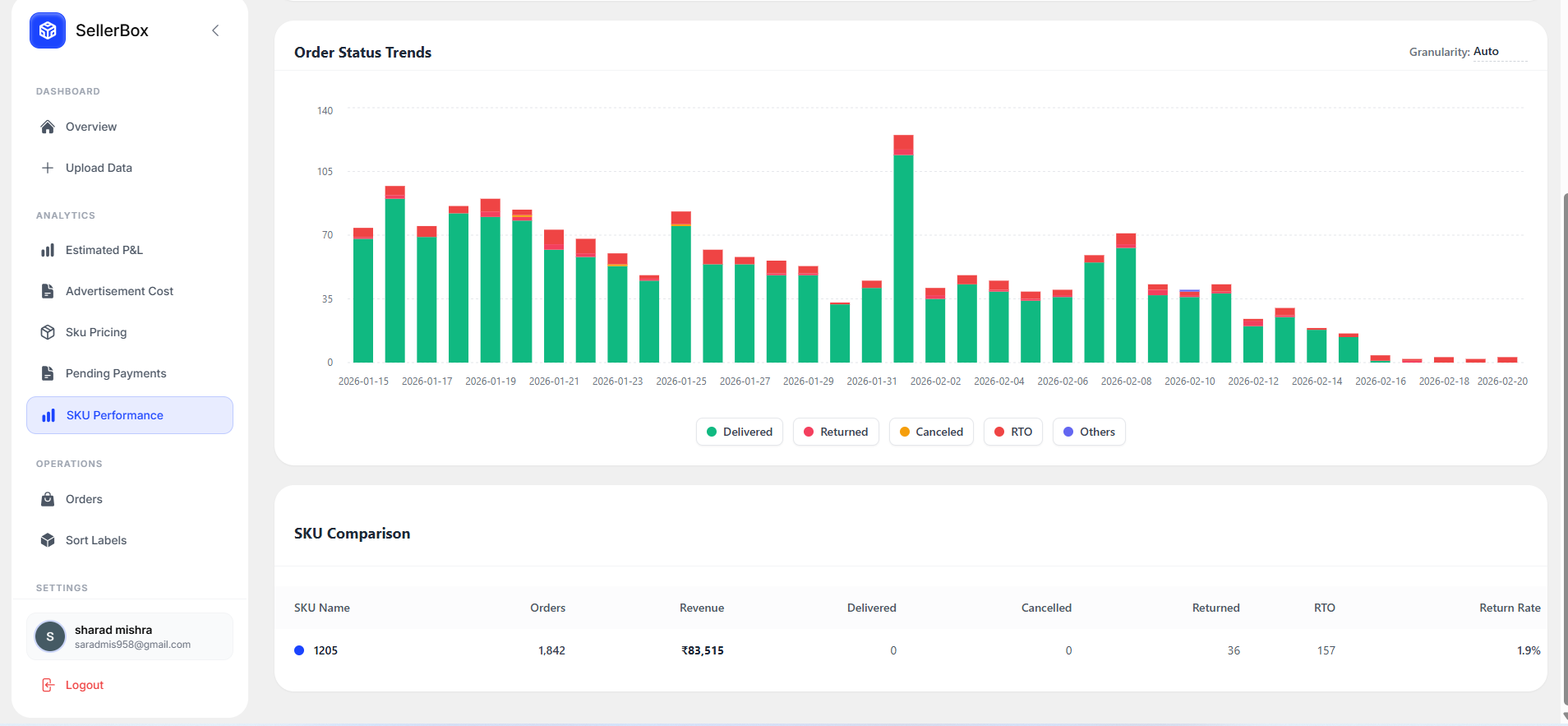
SKU performance

Track delivered, returned, RTO, and cancelled per SKU

Every SKU tells a different story week to week. SellerBox tracks delivered orders, returns, RTO, and cancellations across time so you can see product trends instead of guessing from single-day reports.

  • Delivered vs returned vs RTO vs cancelled breakdown per SKU
  • Custom date ranges to spot seasonality and slow decline
  • Combine related SKU variants for a full picture
  • Flag SKUs that need a price, listing, or inventory decision
SellerBox SKU performance dashboard for Meesho sellers

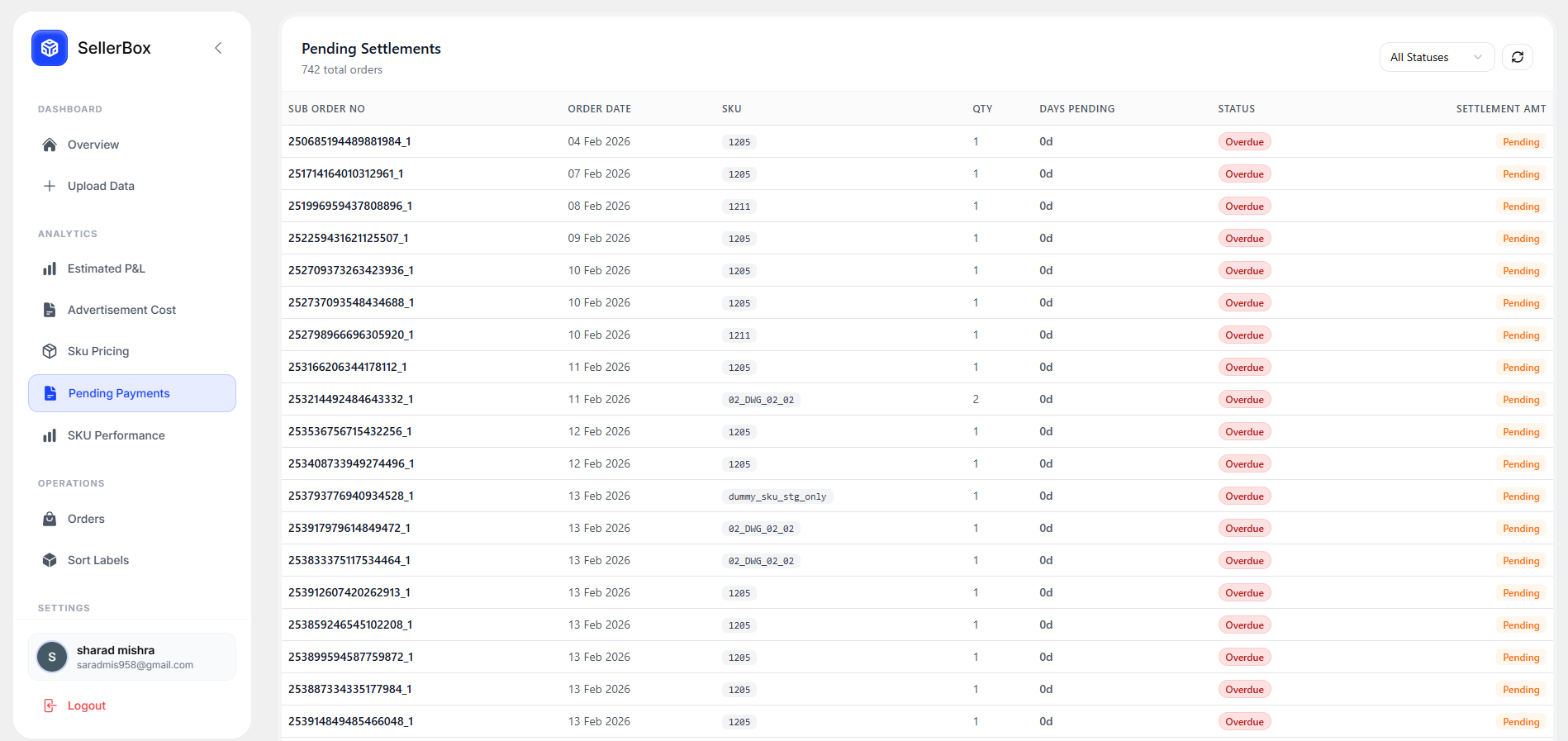
Payout reconciliation

Match every Meesho order to its payout

Meesho settlements arrive in tranches with deductions that don't always match your expectations. SellerBox compares your order data with payout files and surfaces orders that look under-paid, pending, or missing so you can raise them before they age out.

  • Pending settlement view across dates and accounts
  • Order-to-payout matching with variance highlighting
  • Multi-account rollup for sellers with two or more Meesho stores
  • Export-ready view for support tickets
SellerBox Meesho payout reconciliation and pending payments view

Ads performance

See ad orders that actually make you money

Ad reports on Meesho show orders driven by ads, but not what happened after. SellerBox layers delivered, returned, RTO, and cancelled rates on top of ad orders so you can tell useful ads from expensive ones.

  • Ad order delivery and return rate by SKU
  • Ad spend vs ad-driven contribution margin
  • Catch high-ad-spend SKUs with high RTO before they eat profit
  • Compare periods to test bidding and campaign changes
SellerBox Meesho ads performance and ad order quality dashboard

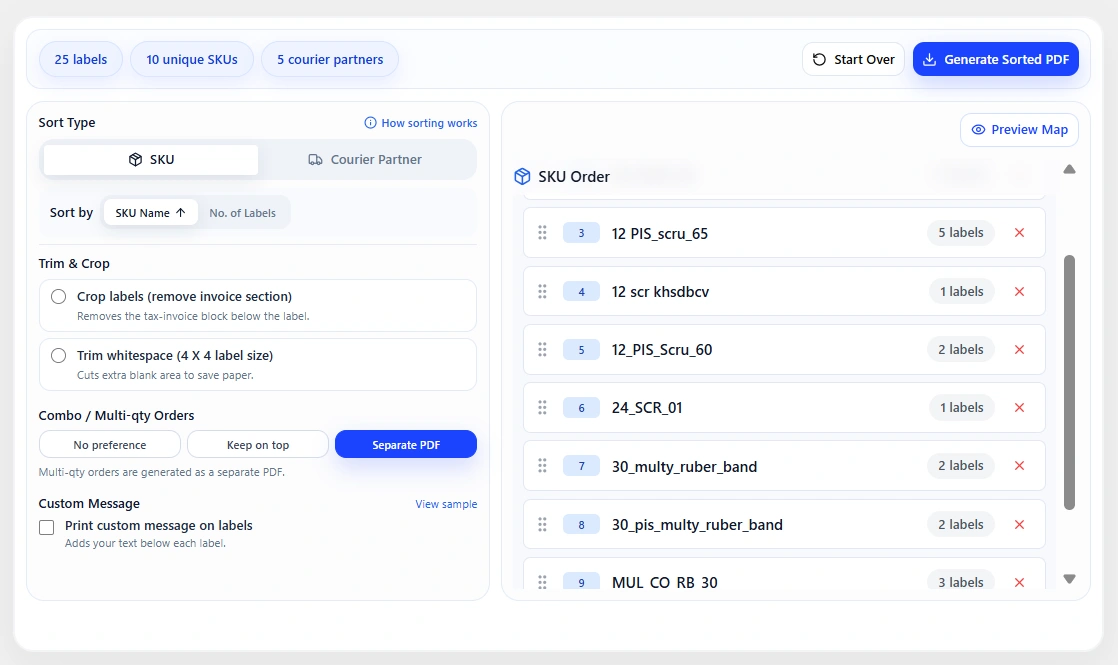
Label crop & sort

Meesho label crop and sort in the same workspace

Alongside the dashboard, SellerBox includes a free Meesho label crop and sort tool. Crop the invoice section, sort labels by SKU or courier, combine files from multiple accounts, and download a print-ready PDF for thermal or A4 printers.

  • SKU-wise and courier-wise label sorting
  • Invoice crop with 4x6 thermal or A4 output
  • Batch labels from multiple Meesho accounts together
  • Preview label order before download
SellerBox Meesho label crop and sort tool with SKU-wise ordering

How it works

From Meesho report to profit answer in four steps

  1. Step 1

    Export files from Meesho Supplier Panel

    Download your order report, payout file, and ad report from the Meesho Supplier Panel for the date range you want to analyze.

  2. Step 2

    Upload to SellerBox

    Drop your Excel and CSV files into SellerBox. The dashboard parses order status, returns, RTO, commission, and settlement lines automatically.

  3. Step 3

    Add SKU making cost

    Enter product cost per SKU once. SellerBox uses it in every profit calculation so you see net profit instead of gross revenue.

  4. Step 4

    Review your Meesho profit dashboard

    Open SKU-wise profit, RTO trends, ad performance, and payout reconciliation. Filter by account, SKU, or date range to answer any question in seconds.

Built for Meesho sellers who want clarity, not more spreadsheets

Multi-account Meesho sellers

Running two or more Meesho supplier accounts? Merge orders, payouts, and labels from every store into one dashboard and one label PDF.

High-RTO categories

Fashion, footwear, and unbranded categories carry heavy RTO. SellerBox surfaces SKUs and couriers pulling your margin down.

Sellers reconciling payouts by hand

Stop matching order IDs to payout lines in Excel. Upload once, see pending payments, and export a shortlist for support tickets.

New sellers scaling up

Move off spreadsheets before order volume outgrows them. SellerBox scales from one account with 100 orders to teams doing thousands.

Free to start

See your real Meesho profit today

Open the SellerBox Meesho dashboard, upload your files, and get SKU-wise profit, RTO, and payout answers in minutes. No Meesho login required.

FAQs

Got questions?
We’ve got answers.

Here’s everything you need to know
before getting started.

Still have questions?

Contact us and we’ll help you out.

1. What is the SellerBox Meesho profit calculator?

The SellerBox Meesho profit calculator turns your Meesho order and payout reports into a SKU-wise profit and loss view. It accounts for revenue, Meesho commission, shipping charges, return deductions, RTO, ad cost, and your product making cost so you see real net profit per SKU instead of gross revenue.

2. Is the SellerBox Meesho seller dashboard free?

3. How is Meesho SKU profit calculated?

4. Does it handle RTO and returns?

5. Can I reconcile Meesho payouts and pending payments?

6. Does SellerBox support multiple Meesho accounts?

7. Do I need to give my Meesho login to SellerBox?

8. Which Meesho reports do I need to upload?

9. How is this different from Meesho's built-in reports?

10. Can SellerBox also crop and sort my Meesho shipping labels?

11. Is my Meesho data safe on SellerBox?

12. Does SellerBox work for Amazon or Flipkart sellers too?